-

Adversary Simulation
Our best in class red team can deliver a holistic cyber attack simulation to provide a true evaluation of your organisation’s cyber resilience.
-

Application
SecurityLeverage the team behind the industry-leading Web Application and Mobile Hacker’s Handbook series.
-

Penetration
TestingMDSec’s penetration testing team is trusted by companies from the world’s leading technology firms to global financial institutions.
-

Response
Our certified team work with customers at all stages of the Incident Response lifecycle through our range of proactive and reactive services.
RIP RegPwn
13th March 2026
As part of MDSec’s R&D work, we often discover vulnerabilities and develop exploits to support our red team engagements. When researching widely used software, it is often only a matter of time before the same vulnerability is discovered by other researchers and reported to the vendor. Two weeks ago we outlined an Elevation of Privilege vulnerability in Windows 11 that we had been leveraging in red teams but decided to report to the vendor ourselves.
Ironically, today we’re documenting another Elevation Of Privilege vulnerability that was so elegant in its indicators, we kept it internal and used with great success across red team engagements since January 2025. For what will become obvious reasons, we named this vulnerability RegPwn and it affected Windows 10 and 11, as well as Windows Server 2012, 2016, 2019, 2022, and 2025. This vulnerability was fixed this Patch Tuesday and we believe is tracked as CVE-2026-24291.
Description
The Windows Accessibility features are a collection of built-in capabilities in Microsoft Windows designed to make the operating system usable for people with disabilities or specific usability needs. These features provide alternative ways to interact with the system through keyboard input, voice, screen narration, visual adjustments, and assistive technologies.
The list of installed accessibility features is defined in following registry key:
HKEY_LOCAL_MACHINE\SOFTWARE\Microsoft\Windows NT\CurrentVersion\Accessibility\ATsWhen some of these Windows accessibility features are used (ex: narrator, on-screen keyboard etc) the following registry key is created and grants full control to a low privilege user:
HKEY_CURRENT_USER\SOFTWARE\Microsoft\Windows NT\CurrentVersion\Accessibility\ATConfig\<accessibility feature name>This registry key will also be populated with the configuration related to accessibility feature used, in this example On Screen Keyboard:

These configurations are then copied to the following registry key in HKLM which is created by winlogon.exe during the login process and grants the logged in user write privileges:
HKLM\SOFTWARE\Microsoft\Windows NT\CurrentVersion\Accessibility\Session<session id>\ATConfig
Windows accessibility features execute in the user context, albeit with High Integrity due to the UIAccess flag. The obvious question then becomes, how can this be abused to obtain SYSTEM privileges?
The answer lies in the Secure Desktop. The primary distinction between the secure desktop and the user desktop is that only trusted processes running as SYSTEM are permitted to execute there. In other words, no processes running with the user’s privileges are present on the secure desktop.
When a user creates a secure desktop session by either locking the workstation or running process via the “Run as administrator” option two atbroker.exe processes are started, one running in the current user context and one running as the SYSTEM account.
The ATbroker.exe process running as the low privileged user will once again copy all configurations from HKEY_CURRENT_USER\SOFTWARE\Microsoft\Windows NT\CurrentVersion\Accessibility\ATConfig\osk
to
HKLM\SOFTWARE\Microsoft\Windows NT\CurrentVersion\Accessibility\Session<session id>\ATConfig\osk
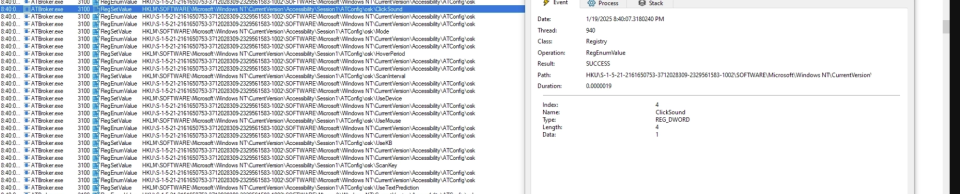
The ATbroker.exe process running as the SYSTEM account will proceed to copy values from HKLM\SOFTWARE\Microsoft\Windows NT\CurrentVersion\Accessibility\Session1\ATConfig\osk
to
HKU\.DEFAULT\Software\Microsoft\Windows NT\CurrentVersion\Accessibility\ATConfig\osk

Finally an instance of the osk.exe process running as SYSTEM is started and copies values from HKU\.DEFAULT\Software\Microsoft\Windows NT\CurrentVersion\Accessibility\ATConfig\osk
to
HKLM\SOFTWARE\Microsoft\Windows NT\CurrentVersion\Accessibility\Session<session id>\ATConfig\osk
As the HKLM\SOFTWARE\Microsoft\Windows NT\CurrentVersion\Accessibility\Session<session id>\ATConfig\osk registry key is writable by the current user and the configuration values are copied from a user-controlled registry location, this behaviour can be abused to achieve an arbitrary registry key write in the context of SYSTEM by leveraging registry symbolic links.
In order to win a small time window between osk.exe starting and writing into the registry key, an opportunistic lock is placed on C:\Program Files\Common Files\microsoft shared\ink\fsdefinitions\oskmenu.xml ,when the oplock is triggered the HKLM\SOFTWARE\Microsoft\Windows NT\CurrentVersion\Accessibility\Session<session id>\ATConfig\osk registry key is replaced with a symbolic link pointing to an arbitrary registry key.
Exploitation
- Obtain the session ID from current access token.
- Create a hidden osk.exe process and sleep 5 seconds to ensure our oplock will be triggered by the system process.
- Modify the
HKEY_CURRENT_USER\SOFTWARE\Microsoft\Windows NT\CurrentVersion\Accessibility\ATConfig\oskkey and add an arbitrary registry value. - Set an opportunistic lock on
C:\Program Files\Common Files\microsoft shared\ink\fsdefinitions\oskmenu.xmlfile. - Trigger the bug by creating a secure desktop via the
LockWorkstation()API. - Once an oplock is triggered, replace the
HKLM\SOFTWARE\Microsoft\Windows NT\CurrentVersion\Accessibility\Session<session id>\ATConfig\oskregistry key with a registry link to arbitrary registry key. - Sleep 5 seconds before deleting the registry link.
In the proof of concept below we overwrite ImagePath of the msiserver service and start the service by creating an instance of the MSI COM object:
Our exploit code for this vulnerability is available here.
This post was written by Filip Dragovic.
